
Introducing the 1-Click Widget Convertor
Contents
- Built for Agencies, Freelancers, and Multi-Client Creators
- How It Works – Just a Few Clicks
- Why This Feature Matters
- Who Should Use the Widget Convertor?
- Common Questions
- Will my widget’s design and functionality be preserved?
- Are there limitations?
- Can I convert widgets with custom code or advanced logic?
- Your Feedback Shapes What’s Next
Build Once. Use Anywhere.
Tired of rebuilding the same widget over and over for Elementor, Gutenberg, or Bricks?
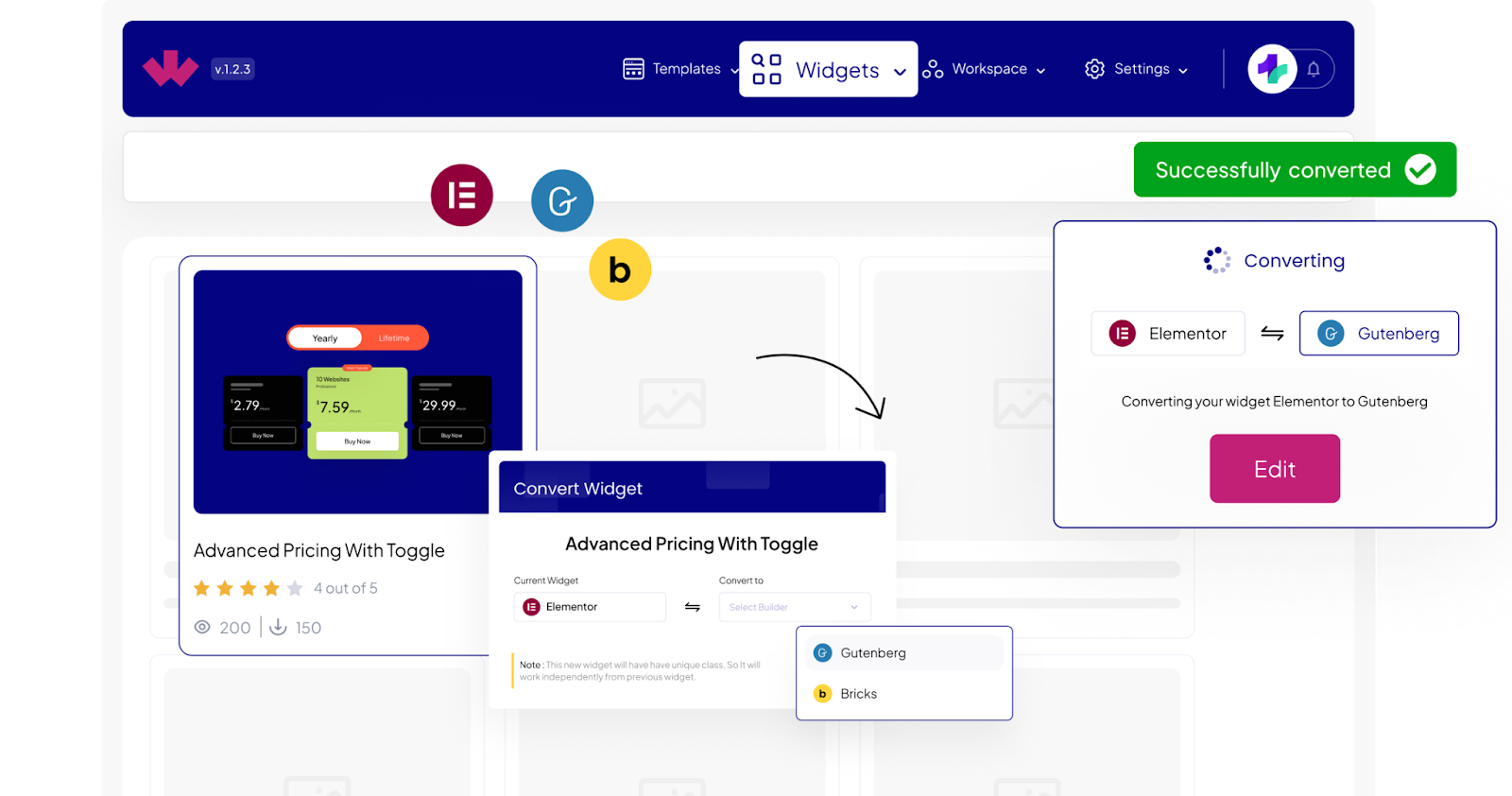
We hear you. That’s why we built the 1-Click Widget Convertor, a time-saving feature inside the WDesignKit Widget Builder that lets you instantly convert widgets between major page builders.
No more duplication, no more frustration. Just design once, then reuse across platforms.
Built for Agencies, Freelancers, and Multi-Client Creators
If you work with multiple clients using different page builders, you’ve likely faced this problem:
- A widget built for Elementor needs to be recreated in Gutenberg
- A block you created for Bricks is now needed in Elementor
- And the cycle continues…
With WDesignKit’s 1-Click Widget Convertor, you can convert your custom widget or block to another builder in seconds—without rebuilding from scratch
How It Works – Just a Few Clicks
The 1-Click Widget Convertor is available only for widgets created inside WDesignKit. You can’t import external widgets or third-party code, only those built with the WDesignKit Widget Builder can be converted.
Here’s how PRO users can use this feature:
- Create a widget using the WDesignKit Widget Builder for your preferred builder (Elementor, Gutenberg, or Bricks).
- Go to the “Widget” section. You’ll see two options:
- My Widgets – Widgets you’ve created
- Browse Widgets – Ready-made widgets by WDesignKit
- Under My Widgets, select the widget you want to convert.
- Click the “Convert” button.
- Choose your target page builder (e.g., convert Elementor widget to a Gutenberg block, or Bricks element to an Elementor widget).
- WDesignKit will instantly generate a converted version of your widget, optimized for the selected builder.
- Make any final tweaks and either use it on your site or save it in your Cloud Workspace for future use across projects.
⚠️ Note: Widget conversion is a PRO-only feature. Free users can build and use widgets, but conversion between builders requires a PRO plan.
Why This Feature Matters
- Save Hours of Work
No more rebuilding widgets manually across builders. Design once and reuse. - Keep Design Consistent
Maintain a unified brand style across all your clients’ sites, regardless of builder. - No Coding Needed
Built for creators of all skill levels. If you can use the widget builder, you can use the convertor. - Future-Proof Your Workflow
Switch builders anytime without worrying about losing design progress or having to start over. - Cloud Workspace Integration
Store and reuse your converted widgets through WDesignKit’s Cloud Workspace. Collaborate with your team or clients, organize your assets, and import them anytime.
Who Should Use the Widget Convertor?
- Agencies juggling multiple client websites with different page builders
- Freelancers who want to work faster and avoid redundant tasks
- Designers & non-tech users who want flexibility without diving into code
- Anyone looking to break free from page builder lock-in
Common Questions
Will my widget’s design and functionality be preserved?
Yes, about 90% of the design and logic will carry over. Some advanced controls may behave slightly differently depending on the builder’s capabilities, but your core structure will remain intact.
Are there limitations?
Only when certain controls aren’t available in the target builder. WDesignKit smartly maps relevant controllers, but a quick review is always recommended post-conversion.
Can I convert widgets with custom code or advanced logic?
Absolutely. Our builder fully supports HTML, CSS, JS, and custom controllers. You’ll get the same seamless interface even when working with custom-built widgets.
Your Feedback Shapes What’s Next
This feature was built based on real-world feedback, and we’re not stopping here.
More enhancements and conversion options are already in the works. If you try the Widget Convertor, we’d love to hear what worked well and what could be even better.
🚀 Ready to save time and streamline your workflow? Try the 1-Click Widget Convertor and see how WDesignKit helps you build once and use everywhere.
Keep reading
Introducing the All-in-One Cloud Workspace
Your Private Hub to Store, Organize, and Share WordPress Design Assets Designing websites often involves juggling files across local folders, cloud drives, multiple tools, and endless zip exports. We have been there. That’s exactly why we created the WDesignKit Cloud Workspace, a centralized, secure space to manage everything from website templates and widgets to Figma …
2 min read
Introducing the WDesignKit Widget Builder
Build Once. Reuse Everywhere, No Coding Required. Building custom WordPress widgets used to mean juggling plugins, writing custom code, and dealing with scattered backups. After years of creating websites and talking with agencies, we noticed a recurring pain: creators needed a unified, easy-to-use system to build and reuse widgets across page builders, without relying on …
2 min read
Introducing WDesignKit’s Figma Templates: Your Blueprint for Modern Web Design
Design smarter. Build faster. With our all-new 50+ Figma Template Kits, you can now prototype and visualize stunning websites in minutes, before ever touching WordPress. We built these templates to save you time, elevate your design quality, and bridge the gap between design and development. What’s Inside? 50+ Figma Kits Each kit includes a variety …
2 min read